
Capture Leads and Follow Up Automatically
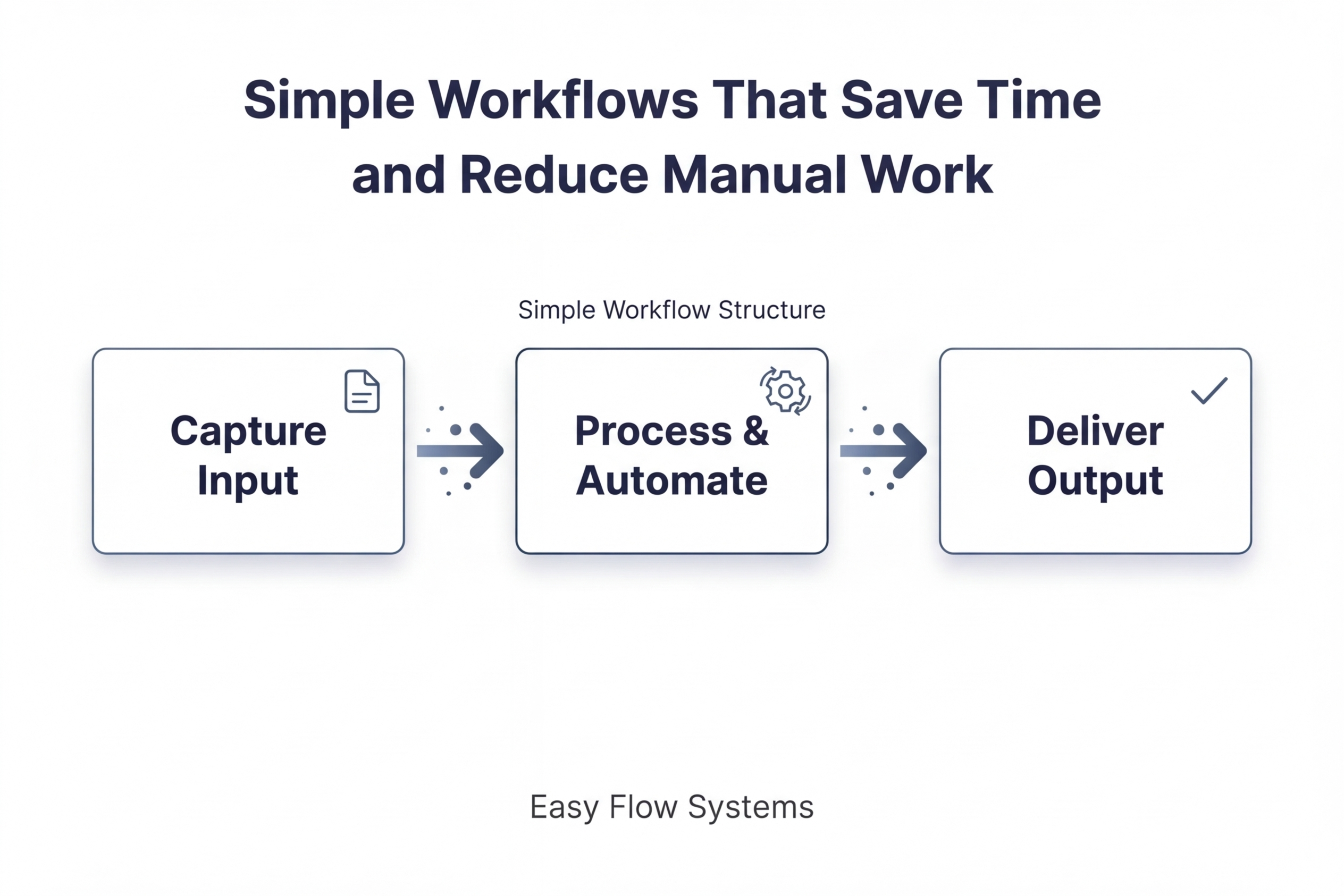
Create a simple system that captures inbound leads, responds instantly, and follows up consistently so no opportunity is missed.
Best for: small businesses and service-based teams managing inbound leads
Built Using: GoHighLevel | ChatGPT
The Problem
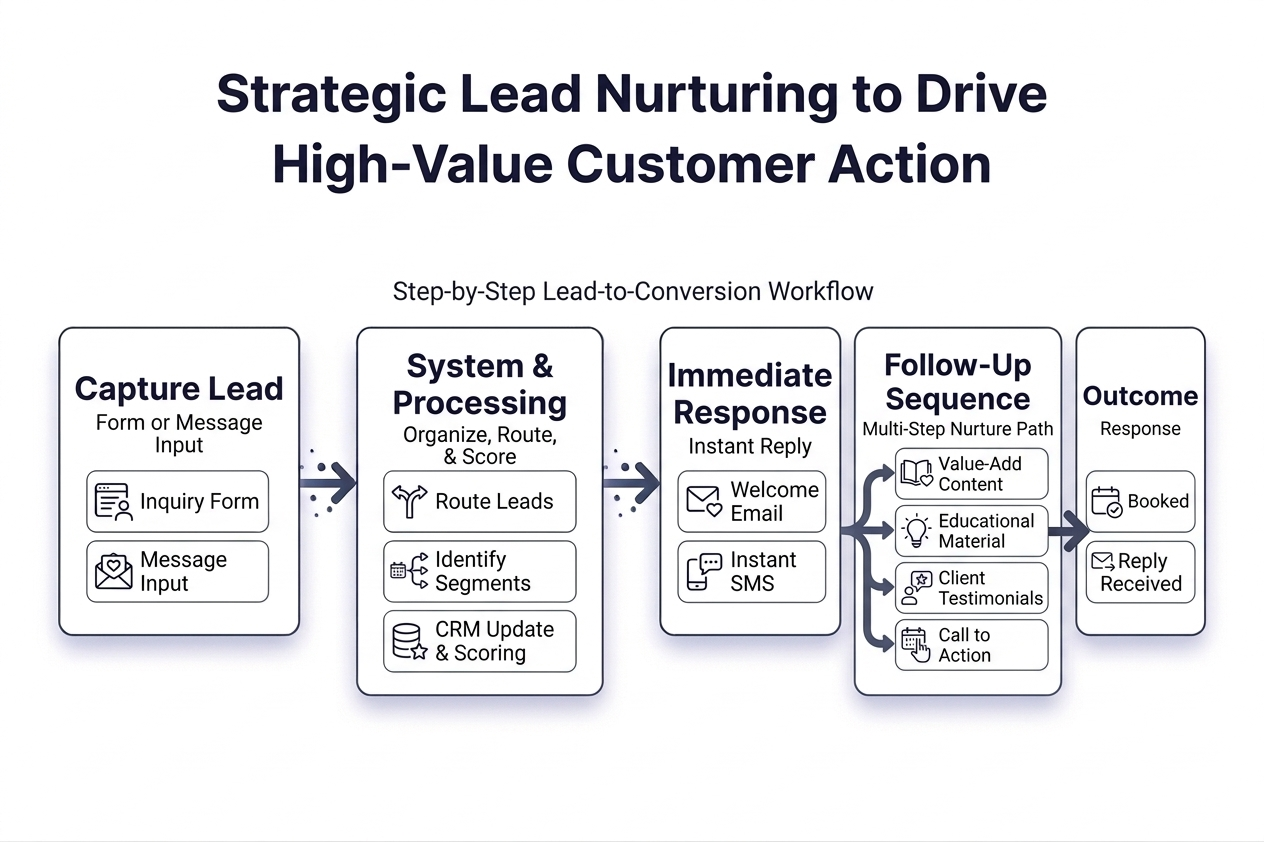
Most leads are captured — but not followed up consistently.
That leads to:
missed opportunities
Leads come in, but no immediate response is sent.
slow response time
Follow-up happens hours or days later, reducing engagement.
inconsistent communication
Some leads get multiple messages, others get none.
no clear next step
Leads aren’t guided toward booking, replying, or taking action.
Even when interest is high, leads are often lost due to delayed or inconsistent follow-up instead of being moved through a structured process.
The Workflow
This workflow turns inbound leads into a structured follow-up system that responds immediately and drives action.
Step 1 — Capture
Form submission
Message inquiry
Step 2 — Respond
Instant reply
Store lead
Step 3 — Follow Up
Reminders
Next step
The Guide
How to Actually Use This Workflow
This guide shows how to capture inbound leads, respond automatically, and follow up consistently using GoHighLevel, GoHighLevel’s AI workflow builder, and simple multi-channel sequences so leads do not get lost or ignored.
Tool used in this workflow: GoHighLevel (used for forms, CRM, automation, follow-up sequences, and calendar booking)
This guide uses GoHighLevel as an example tool (affiliate link).
Important: Think of AI as a personal assistant, not an executive. The human provides the direction, judgment, and standards. AI helps execute on that direction faster.
Simple rule: you decide what counts as a lead, what should happen next, what message should be sent, and what outcome matters. AI helps draft, organize, and speed up the build process.
Start Here
If you only follow one path, follow this one:
- Create one lead capture form in GoHighLevel.
- Send all form submissions into your GHL CRM or another connected CRM.
- Use GHL’s AI workflow builder to create the workflow structure.
- Add an immediate response and short multi-channel follow-up sequence.
- Use ChatGPT to draft and refine the actual messages with merge tags already in place.
- Send leads to a clear next step such as booking a calendar appointment or replying.
- Review the workflow before sending real leads through it.
That’s the full system in its simplest form.
Step 1 — Create the Lead Capture Form
Tool: GoHighLevel Forms or Surveys
Start by creating one form that collects inbound lead information in a consistent way.
At minimum, your form should include:
- name
- email address
- phone number if you plan to text or call
- message or request field
How to build it in GHL:
- Go to Sites → Forms
- Create a new form
- Add only the fields you actually need
- Save the form and embed it on your website or landing page
- Make sure submissions go into your GHL CRM or pipeline
If you use another CRM, you can still use GHL for capture and automation, then connect it to your external CRM using Zapier or Make.
Example
Lead source: website contact form
Goal: collect the inquiry and move it into an automated follow-up process immediately.
Step 2 — Define What Happens Immediately After Submission
Tool: GoHighLevel Workflows
Once the form is submitted, define the first actions that should happen automatically.
For most workflows, that includes:
- sending a confirmation email
- sending a text message if appropriate
- creating an opportunity in the pipeline
- adding a tag or status
How to build it manually in GHL:
- Go to Automation → Workflows
- Create a new workflow
- Set the trigger as Form Submitted
- Add actions:
- Send Email
- Send SMS (optional)
- Create/Update Opportunity
- Add Tag
What you should have now
A lead can submit the form and immediately receive a response while also being stored and tracked in one system.
Step 3 — Use GHL’s AI Workflow Builder to Create the Sequence
Tool: GoHighLevel AI Workflow Builder
This workflow is built using GoHighLevel , which combines lead capture, CRM, automation, messaging, and calendar booking in one system.
If you want to speed up the build, use GHL’s AI workflow builder to generate the workflow structure first, then refine it manually.
How to use it:
- Go to Automation → Workflows
- Create a new workflow
- Open the AI workflow builder
- Paste in a clear prompt describing the trigger, sequence, channels, and stop conditions
- Review what it generates before turning it on
Create a 30-day lead nurture workflow.

Trigger:
- Form submitted

Goal:
- Respond immediately
- Nurture lead over 30 days
- Drive reply or booked appointment

Initial steps:
- Create/update contact
- Add tag: New Lead
- Create opportunity in pipeline
- Send confirmation email
- Send SMS if phone exists

Sequence:
Day 1:
- Email follow-up

Day 2:
- SMS follow-up

Day 5:
- Email with helpful info or FAQ

Day 7:
- Internal notification: review or call lead

Day 10:
- Email follow-up

Day 14:
- SMS check-in

Day 18:
- Email with value or reminder

Day 21:
- Internal notification: call lead

Day 30:
- Final re-engagement email

Rules:
- If no phone → skip SMS
- If lead replies → notify team and stop automation
- If appointment booked → stop workflow and tag: Booked
- If opportunity closed → stop workflow

Include:
- Wait steps between each action
- Clear step names
- Multi-channel follow-up using email, SMS, and internal notifications

Tone:
- Simple, helpful, not aggressive
- Focus on response and booking
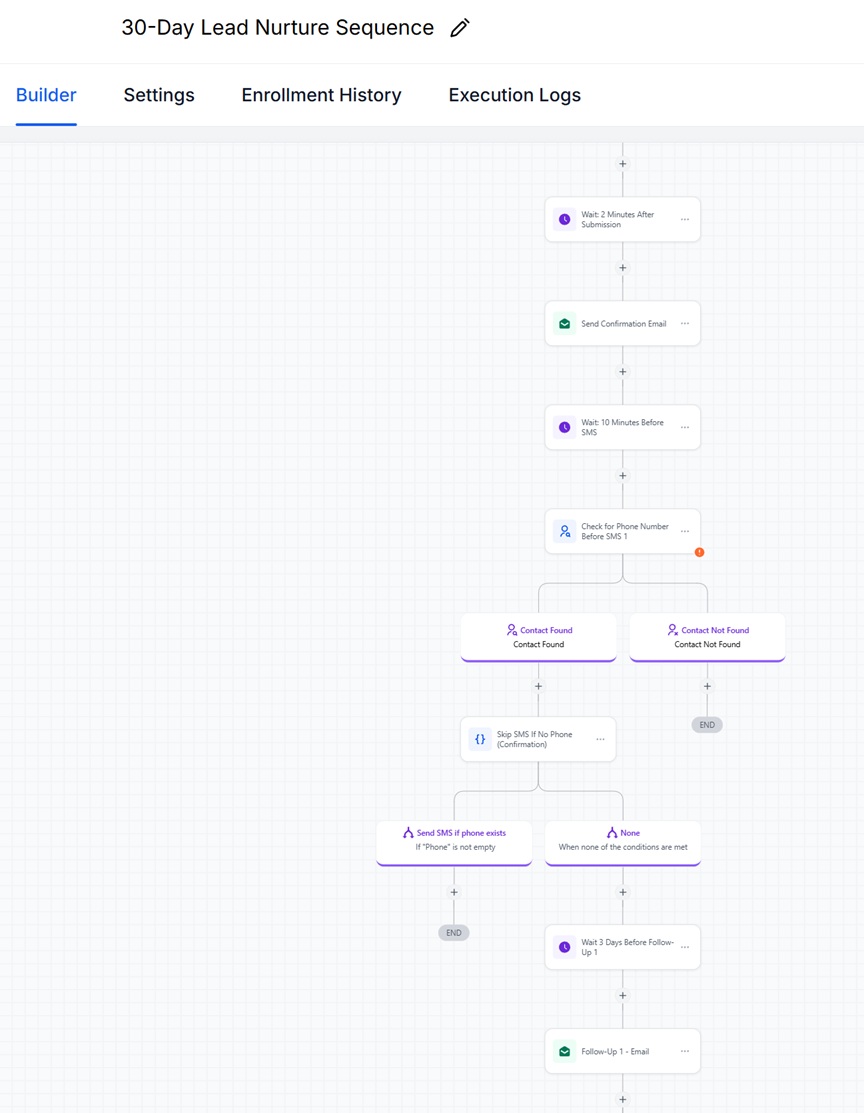
Once the AI builder generates your workflow, it will look something like this:
Example Workflow (Built in GoHighLevel)
Example of a lead nurture workflow generated inside GoHighLevel using the AI builder. Your version can be simpler depending on your setup.
Step 4 — Use ChatGPT to Draft the First Response
Once the immediate response step is mapped, use ChatGPT to draft the message so it is already ready for copy and paste into GHL.
Tell ChatGPT what fields are in your form and have it include merge tags or placeholders in the message.
Write a simple follow-up email for a new lead who just submitted a form in GoHighLevel.

Use these merge tags:
- {{contact.first_name}}
- {{contact.email}}
- {{contact.phone}}

Include:
- a thank you
- confirmation that we received their request
- what happens next
- a simple next step if appropriate

Keep it short, clear, and conversational.
Make it ready to copy and paste into GoHighLevel.
Write a short SMS message for a new lead who just submitted a form in GoHighLevel.

Use this merge tag:
- {{contact.first_name}}

Requirements:
- under 300 characters
- natural and clear
- confirm we received the request
- mention the next step

Make it ready to copy and paste into GoHighLevel.
Use the draft as a starting point, then revise it to match your actual voice and next step.
Step 5 — Build the Follow-Up Sequence
Tools: GoHighLevel Workflows, ChatGPT
After the first message is sent, build a short sequence that keeps the lead engaged until they reply or take action.
Use a multi-channel approach whenever it makes sense: email, text, and call.
A practical version might look like this:
- Message 1: immediate email confirmation
- Message 2: immediate or same-day SMS
- Message 3: email follow-up after 1 day
- Message 4: reminder after 2–3 days
- Message 5: internal notification to call the lead if no response
How to build it in GHL:
- Use the workflow created by the AI builder or add these steps manually
- Add a Wait step after the first message
- Add the next email or SMS
- Repeat with wait steps between messages
- Add an Internal Notification action to trigger a call task or direct outreach
- If your team uses the LeadConnector app, that notification can prompt a call from inside the app
- Stop the sequence if the lead replies or books
What you should have now
A simple multi-channel follow-up workflow that responds immediately and keeps leads moving without relying on memory or manual reminders.
Step 6 — Use ChatGPT to Draft the Follow-Up Sequence
Once the sequence is mapped, use ChatGPT to create the actual follow-up messages in a format you can paste directly into GHL.
Create a multi-channel follow-up sequence for a new lead who submitted a form in GoHighLevel but has not replied yet.

Use these merge tags where appropriate:
- {{contact.first_name}}
- {{contact.email}}
- {{contact.phone}}

Write:
1. one follow-up email for Day 1
2. one SMS for Day 1 or Day 2
3. one reminder email for Day 3
4. one final follow-up message
5. one short internal note for a team member to call the lead

Keep the tone natural, professional, and clear.
Make each message ready to copy and paste into GoHighLevel.
Rewrite the following follow-up messages so they feel more helpful and less pushy.

Requirements:
- keep them short
- sound human
- make the next step obvious
- avoid generic sales language
- preserve the merge tags exactly as written

Messages:
[PASTE MESSAGES HERE]
Step 7 — Connect the Workflow to a Clear Next Step
Every follow-up workflow needs to point somewhere. Do not stop at “just checking in.”
The next action could be:
- book a calendar appointment
- reply to the email or text
- complete a short intake form
- review a resource
For booking, you can use:
- GoHighLevel Calendar
- Calendly
- a calendar connected to Google Calendar or Outlook
If the lead does not know what to do next, the sequence is incomplete.
Step 8 — Store and Track the Lead Properly
Tool: GoHighLevel CRM / Pipeline
Once the lead enters the workflow, make sure it is stored and tracked in one place.
At minimum, track:
- lead source
- date submitted
- current status
- last contact date
- next action
If your team uses another CRM, you can still push the lead data out of GHL using Zapier or Make.
Step 9 — Review and Improve the Workflow
Once the system is live, review how the workflow actually performs.
Look for:
- forms that ask for too much information
- weak response rates on the first email or text
- follow-up gaps
- messages that sound robotic
- no clear action after follow-up
- AI-generated workflows that created extra steps you do not need
A lead workflow should get simpler and stronger over time — not more complicated.
Quality Check: Keep the Workflow Useful and Human
Automation saves time, but it should not create generic or careless follow-up. Review the workflow before using it at scale.
1. Validate the Lead Path
When: before launching the workflow.
What to check:
- Does the form match the offer or inquiry?
- Is the next step clear?
- Are you asking for too much too early?
If the entry point is weak, the rest of the workflow will underperform.
2. Review the AI-Built Workflow Carefully
When: after GHL’s AI workflow builder generates the structure.
What to check:
- Are the step names clear?
- Are the wait times reasonable?
- Did it include any unnecessary actions?
- Are the stop conditions correct?
- Does the sequence actually match your lead intent?
Use AI to speed up the build, but do not assume the first version is correct by default.
3. Review the Messages Carefully
When: after ChatGPT drafts the messages.
What to check:
- Do the messages sound human?
- Is the next step obvious?
- Is anything too generic or too long?
- Do the merge tags and placeholders match your actual GHL fields?
- Does the message match the stage of the lead?
Review the following follow-up message and improve it.

Focus on:
- making it clearer
- removing generic language
- tightening the wording
- making the next step obvious
- keeping the tone human
- preserving the merge tags exactly as written

Message:
[PASTE MESSAGE HERE]
4. Watch for Automation Drift
What drift looks like:
- too many messages
- repetitive follow-up
- robotic or over-automated tone
- messages that keep going without a clear reason
- AI-generated workflow logic that becomes more complex than needed
What to do:
- remove weak steps
- shorten the sequence
- make the next action clearer
- match the workflow to actual lead intent
5. Review by Channel
Email: more context, clear next step, easy to skim.
Text: shorter, direct, conversational, one action only.
Call notification: should make it obvious when a team member needs to reach out.
Calendar booking: should be simple and easy to complete.
Each part of the workflow should fit the channel instead of feeling copied and pasted.
6. Do a Final Human Pass
Before sending real leads through the workflow, ask:
- Would I respond to this message?
- Does this feel timely and relevant?
- Is this sequence helpful instead of pushy?
- Can someone clearly see what happens next?
- Are the notifications, calls, and booking steps actually connected and working?
If the answer is no, revise it before using automation at scale.
Workflow rule: GHL’s AI workflow builder can help generate the structure quickly. ChatGPT can help draft the messages. A human should still review the workflow before launch to make sure it is accurate, useful, and aligned with how real leads should be handled.
Full Example
Lead source: website contact form in GoHighLevel.
Immediate action: confirmation email and SMS are sent automatically, and the lead is added to the pipeline.
Workflow build: GHL AI workflow builder creates the sequence structure, then the steps are refined manually.
Sequence: follow-up email, reminder text, internal call notification, and booking link.
Next step: book a meeting through GoHighLevel Calendar, Calendly, or a calendar connected to Google or Outlook.
Tools used:
- GoHighLevel form
- GoHighLevel AI workflow builder
- GoHighLevel workflow automation
- GoHighLevel CRM pipeline
- GoHighLevel calendar or Calendly
- LeadConnector app for call follow-up
- ChatGPT for message drafting and refinement
- Zapier or Make if syncing with another CRM
Quick Start Version
- Get Free trial of GoHighLevel.
- Create one lead form in GoHighLevel.
- Send all submissions into your GHL CRM or another CRM through Zapier or Make.
- Use GHL’s AI workflow builder to create the nurture workflow structure.
- Trigger an immediate email and optional SMS reply.
- Build a short multi-channel follow-up sequence.
- Use ChatGPT to draft and refine the messages with merge tags already included.
- Send leads to a clear next step such as booking a calendar appointment.
- Use notifications or the LeadConnector app to trigger a call when needed.
- Review the workflow before sending real leads through it.
Ready to Build This Workflow?
Start with the tool that runs this system:
👉 [ Start Free 14-Day Trial of GoHighLevel ]Explore
Legal
© Easy Flow Systems
Easy Flow Systems publishes practical workflows built from real-world use of tools.
Tools are referenced based on their role within workflows — not as standalone recommendations.
This site may contain affiliate links. We may earn a commission at no additional cost to you.
Powered by VAMO Digital Inc.